NetlifyCMS + Gatsby製ブログにシンタックスハイライトを導入する方法
NetlifyCMSのGatsbyテンプレートにgatsby-remark-prismjsを導入して、Markdownのコードが色分けされるようにする方法を紹介します。
Tags
prismjsとは
Prism is a lightweight, extensible syntax highlighter, built with modern web standards in mind.
公式サイト
ようするに、最新のめっちゃ軽いシンタックスハイライターです。
公式サイトにいくつかテーマがあり、それをインポートすればかっこいいシンタックスハイライトが実現できます。
もちろんcssをオーバーライドすればカスタマイズすることも可能です。
gatsby-remark-prismjsの導入
コンソールで以下のコマンドを実行すれば、gatsby-remark-prismjsをインストールすることができます。
▼コンソール
yarn add gatsby-transformer-remark gatsby-remark-prismjs prismjs次に、gatsby-config.jsでgatsby-remark-prismjsをgatsby-transformer-remarkのオプションとして設定します。
gatsby-remark-prismjs|GatsbyJS
で細かい設定項目が確認できます。以下はリンク先から引用したコードです。(一部翻訳)
▼gatsby-config.js
plugins: [
{
resolve: `gatsby-transformer-remark`,
options: {
plugins: [
{
resolve: `gatsby-remark-prismjs`,
options: {
// コードを含む <pre> タグにつけるプレフィックス(接頭辞)
// デフォルト値は 'language-' (例: <pre class="language-js">).
classPrefix: "language-",
// インラインコードの言語設定
inlineCodeMarker: null,
// 言語エイリアスの設定
// 例えば、{sh: "bash"} とすればbashをshとして利用できる
aliases: {},
//行番号の表示をコードと一緒にグローバルに切り替える
//使用するには"prismjs/plugins/line-numbers/prism-line-numbers.css"をimportする必要がある
//デフォルトはfalse.
//特定のコードブロックでのみ行番号を表示する場合は、
// falseのままにして、{numberLines:true}構文を使用する
showLineNumbers: false,
//これをtrueに設定すると、パーサーはインラインを処理および強調表示しない
//インラインはマークダウン上では、`this`のようなコードをさす
noInlineHighlight: false,
// This adds a new language definition to Prism or extend an already
// existing language definition. More details on this option can be
// found under the header "Add new language definition or extend an
// existing language" below.
languageExtensions: [
{
language: "superscript",
extend: "javascript",
definition: {
superscript_types: /(SuperType)/,
},
insertBefore: {
function: {
superscript_keywords: /(superif|superelse)/,
},
},
},
],
// Customize the prompt used in shell output
// Values below are default
prompt: {
user: "root",
host: "localhost",
global: false,
},
// By default the HTML entities <>&'" are escaped.
// Add additional HTML escapes by providing a mapping
// of HTML entities and their escape value IE: { '}': '{' }
escapeEntities: {},
},
},
],
},
},
]テーマの設定
Layout.jsでテーマをインポートすれば全体に適応されます。
▼Layout.js
import "prismjs/themes/prism-tomorrow.css"
この段階だとall.sassの影響で数字の表示が崩れていたので
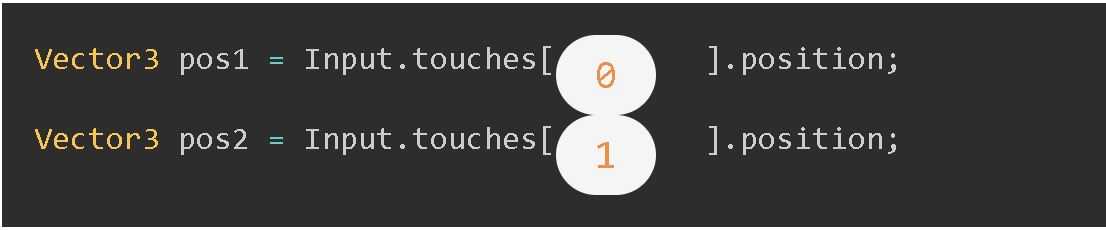
all.sassの最後に
▼all.sass
.number
  background-color: initial;
  display: initial;
  margin-right: initial;
  font-size: initial;
  padding: initial;
を追加しnumberをオーバーライドします。
以上になります。ありがとうございました。